mBot STEM Projects for Kids: A Fun and Interactive Coding Robot Kit
Key Takeaways
- The mBot is a coding robot kit designed for kids aged 8-12.
- It's easy to assemble and use, with a user-friendly interface.
- The mBot is a great way to introduce kids to coding and robotics.
Are you looking for a fun and interactive way to introduce your kids to the world of coding and robotics? Look no further than the mBot, a cutting-edge coding robot kit designed specifically for kids aged 8-12. With its easy-to-assemble design and user-friendly interface, the mBot is the perfect way to get your kids started on their coding journey.
About mBot
The mBot is a STEM learning robot kit designed for kids aged 8-12, providing a fun and interactive way to learn about electronics, robotics, and programming. As a programmable robot, the mBot is an excellent educational tool for kids to learn programming step by step via interactive software and learning resources.
| Feature | Details |
|---|---|
| Entry-level Coding Robot | Designed for learning electronics, robotics, and programming in a simple and fun way. |
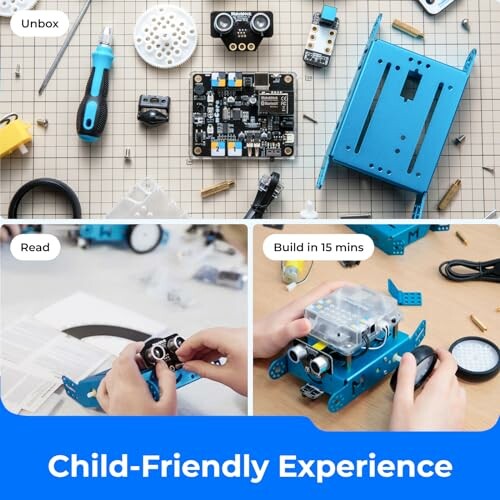
| Easy to Build | Can be easily built within 15 minutes with just a screw, allowing kids to learn more about electronics, machinery, and robotics components. |
| Rich Tutorials for Programming | Includes rich tutorials, available both online and on coding cards, along with three free Makeblock apps and mBlock software. |
| Creativity Encouraged | Compatible with rich add-on packs, allowing kids to customize their mBot and connect it to over 100 electronic modules and 500 parts from the Makeblock platform. |
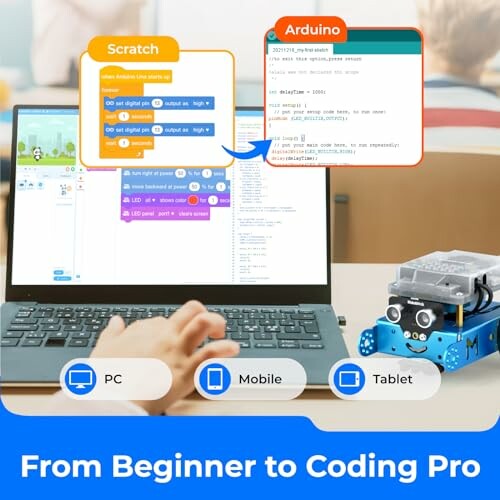
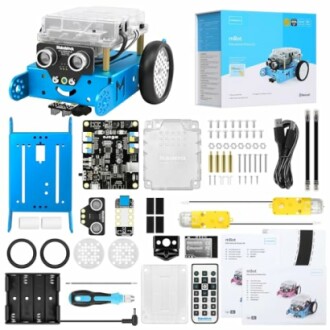
The mBot is designed to be easy to use, with a user-friendly interface that allows kids to start coding and programming right away. The kit includes a screwdriver, battery, and other necessary components, making it easy to get started.
- Learn programming step by step via interactive software and learning resources
- Easily build and customize the robot with add-on packs
- Develop problem-solving skills and creativity through coding and programming
Programmable Robot with Multi-Functions
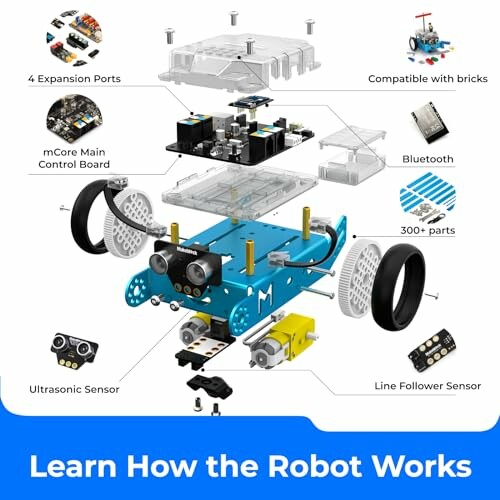
The mBot is a programmable robot that can be controlled remotely using a laptop or tablet. It also includes multi-functions such as line-follow, obstacle-avoidance, and more, making it a fun and interactive way to learn about programming and robotics.
Pros and Cons of mBot Coding Robot Kit
Pros
- Easy to assemble and use, making it perfect for kids to learn about robotics and coding.
- Includes rich tutorials and learning resources, allowing kids to learn programming step by step.
- High-quality components and materials ensure durability and longevity of the robot.
- Compatible with various add-on packs, allowing kids to customize and enhance their coding experience.
- Develops problem-solving skills, creativity, and critical thinking in kids.
Cons
- Some parts may require adult supervision or assistance during assembly.
- A few users reported that one of the parts frequently fell off when running the robot.
- Might not be suitable for very young children due to small parts and complexity of the robot.
In conclusion, the mBot coding robot kit is an excellent educational tool for kids to learn about robotics and coding. While it may have some minor drawbacks, the pros far outweigh the cons. With its easy-to-assemble design, rich learning resources, and high-quality components, the mBot is an excellent investment for parents and educators looking to introduce kids to the world of coding and robotics.
Unlock the Power of Coding with mBot: Tips for Buying and More
Now that you've learned about the amazing features and benefits of the mBot coding robot kit, it's time to take your coding journey to the next level. Here are some valuable tips to help you get the most out of your mBot and avoid common mistakes that beginners often make.
- Start with the basics: Make sure your kids have a solid understanding of programming concepts before diving into advanced coding.
- Practice makes perfect: Encourage your kids to practice coding regularly to develop their skills and build confidence.
- Explore and experiment: Don't be afraid to try new things and experiment with different coding languages and techniques.
When it comes to buying similar products, here are some things to keep in mind:
- Look for ease of use: A coding robot kit should be easy to assemble and use, even for beginners.
- Rich learning resources: A good coding robot kit should come with plenty of learning resources, such as tutorials and coding cards.
- Customization options: Look for a coding robot kit that allows for customization and add-on packs to keep your kids engaged.
In conclusion, the mBot coding robot kit is an excellent educational tool for kids to learn about robotics and coding. With its ease of use, rich learning resources, and customization options, it's the perfect way to introduce your kids to the world of coding. Whether you're a parent or educator, the mBot is an excellent investment for anyone looking to encourage kids to learn and have fun while doing it.
- Final Recommendation: The mBot coding robot kit is a great choice for anyone looking to introduce kids to robotics and coding.